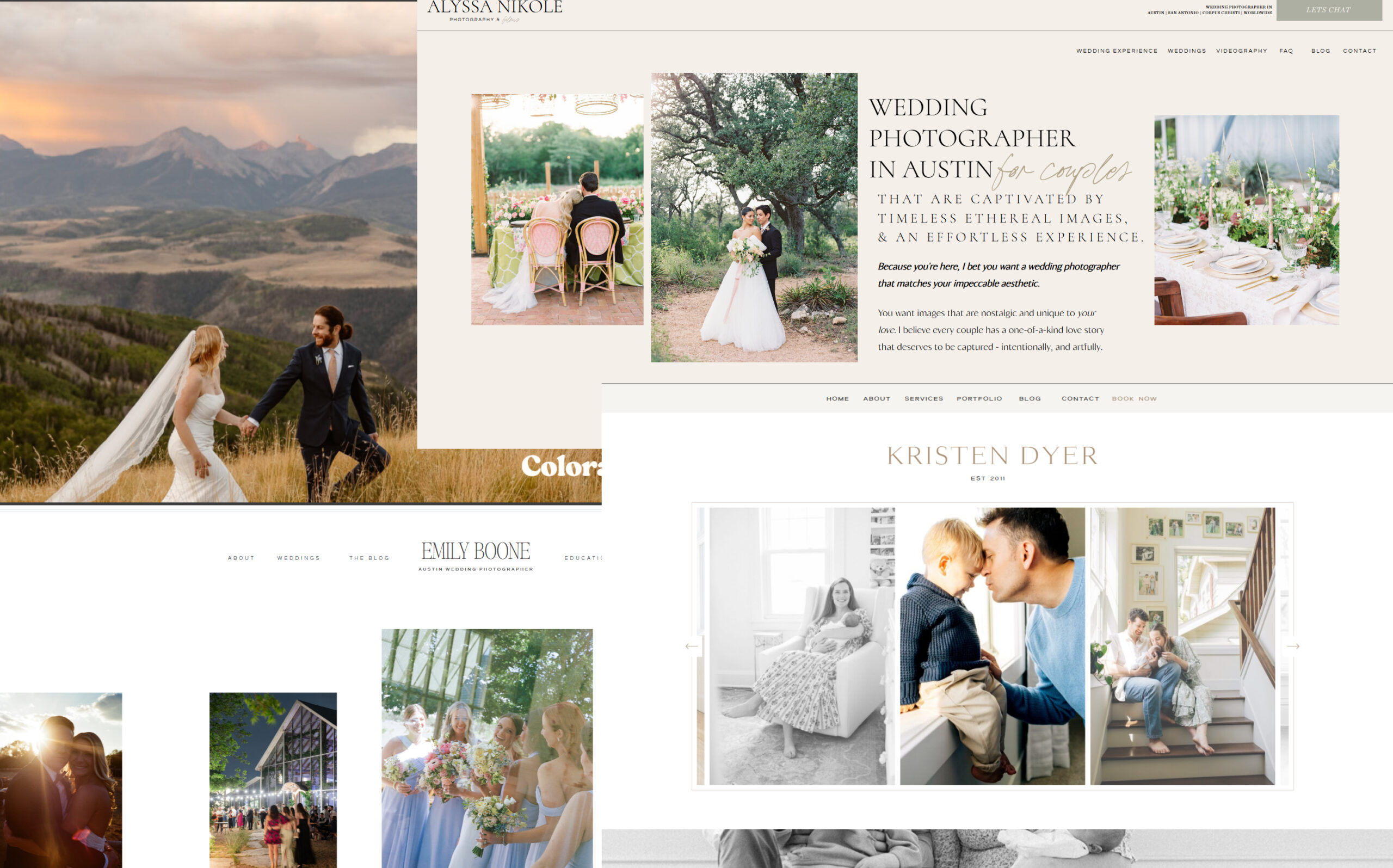
In short: this 2026 study looks at photography website design and SEO across 50 real photographer websites, so you can see what actually helps photographers get found on Google (and what doesn’t). It’s the 2026 edition, and I’ll update it every year.
By Kami Alicja, Showit website designer & SEO specialist for wedding photographers. Last updated November 9, 2026.
You’ve probably heard it all: “You need a blog.” “Speed matters.” “Get your SEO score up.” But which of those things actually make a difference for photographers?
I wanted real answers, not guesses. So I sat down with a cup of tea (okay, several), opened 50 photographer websites and reviewed every single one for SEO, speed, accessibility and first impressions. I logged more than 40 data points per website, from how many keywords each site ranks for to whether you can tell what the photographer does within five seconds.
Some results made total sense. A few genuinely surprised me. And one finding might change how you think about your SEO score forever. Grab a coffee, and let’s dig into the data together. ☕
Table of Contents
- Key findings at a glance
- About this study (methodology)
- The typical photographer website, by the numbers
- Finding 1: Keywords drive traffic, not your SEO score
- Finding 2: Fresh blogs win (and quiet blogs fade)
- Finding 3: Say what you do and where you do it
- Finding 4: Mobile is the biggest gap
- Finding 5: First impressions need a little love
- Finding 6: Accessibility is quietly being missed
- Finding 7: Trust signals and inquiry boosters
- Finding 8: The behind-the-scenes housekeeping
- Finding 9: What the busiest websites have in common
- What wedding photographer websites do differently
- Standout websites worth a peek
- A fun extra: the em dash trend
- How to audit your photography website design and SEO (my checklist)
- Photography website design: what to focus on in 2026
- The full data: all 50 websites
- Frequently asked questions
- How to cite this study
Key findings at a glance
- The number of keywords a site ranks for is the strongest predictor of traffic. Keywords and traffic were very closely linked (a correlation of 0.88), while SEO score and traffic were only moderately linked (0.37).
- A high SEO score doesn’t guarantee visitors. 16 of the 50 sites scored 90+, yet two of those got 5 or fewer estimated visits a month.
- Fresh blogs win. Sites with a blog post from the last 6 months had a median of 276 visits a month, compared to 57 for sites whose blogs had gone quiet and 44 for sites with no blog at all.
- Saying what you do and where you do it matters. The 5 sites that didn’t put their niche and location in their page title or main heading had a median of 0 organic visits, vs 151 for the rest.
- Mobile is the weak spot. The median mobile speed score was 63, compared to 84 on desktop. 44 of 49 sites were slower on mobile, and only 1 scored 90+.
- First impressions need work. Only 22% of sites had a button above the fold, and 26% left me unsure what the photographer did or what to do next.
- Most sites miss basic accessibility. 68% failed Google’s color contrast check, meaning some text is hard to read for many visitors.
- Traffic is concentrated at the top. The 5 busiest sites received 59% of all estimated traffic across the 50 websites.
About this study (methodology)
I’m a big believer in showing my working, so here’s exactly how I ran this photography website design and SEO study.
The websites
50 photography websites, chosen to cover a mix of niches and locations rather than at random:
- 25 wedding & elopement photographers
- 10 newborn & family photographers
- 13 commercial, branding & headshot photographers
- 2 other niches (equine and senior portraits)
By location: 33 are in the US, 9 in the UK, 3 in Canada, 2 in Europe and 1 in Australia, plus 1 that travels worldwide and 1 with no location stated.
The tools
- Ubersuggest: domain authority, on-page SEO score, organic keywords, backlinks, estimated monthly organic traffic and a site crawl (pages crawled, SEO issues, missing headings, title tags, meta descriptions, broken links)
- Google PageSpeed Insights (Lighthouse): mobile and desktop performance and accessibility scores
- A WCAG accessibility checker: an overall accessibility score out of 100
- Manual review: I checked every site myself on desktop and mobile for hero copy, a “5-second test”, navigation, buttons, typography, testimonials, pricing, FAQs, blogs, lead magnets, legal pages and footer dates
Why I use medians, not averages
A few very large websites skew the averages wildly. One site hosted on a gallery platform’s subdomain “inherited” almost 3 million backlinks from the platform itself, which pushed the average backlink count to over 61,000. The median (the middle website) was 276. Medians tell you what’s typical.
A few honest caveats
- Traffic and keyword figures are estimates from Ubersuggest, not real visitor numbers. They’re great for comparing sites, but they won’t match Google Analytics exactly.
- This is a snapshot. Data was collected in 2026, and blog freshness was measured on November 5, 2026.
- Correlation isn’t causation. When I say two things go together, I mean exactly that, and I’ll point out where something else might be going on.
- One of the 50 websites belongs to a past client of mine. I’ve included it for completeness, and it doesn’t change any of the overall findings.
The typical photographer website, by the numbers
Before we get to the trends, here’s what the “middle” website in this study looks like:
| Metric | Median | Range |
|---|---|---|
| Domain authority | 15 | 1 to 88 |
| On-page SEO score | 80 / 100 | 57 to 100 |
| Organic keywords ranked for | 89 | 0 to 781 |
| Backlinks | 276 | 0 to ~3 million |
| Estimated organic visits per month | 140 | 0 to 3,413 |
| Pages crawled | 189 | 11 to 2,832 |
| SEO issues found | 89 | 0 to 1,712 |
| Mobile performance (PageSpeed) | 63 | 30 to 98 |
| Desktop performance (PageSpeed) | 84 | 39 to 100 |
| Mobile accessibility (PageSpeed) | 87 | 57 to 100 |
| WCAG accessibility score | 87 | 27 to 98 |
What this means for you: if your website gets around 140 visits a month from Google and ranks for 80 to 90 keywords, you’re right in the middle of the pack. That’s a lovely starting point, and there’s lots of room to grow.
Finding 1: Keywords drive traffic, not your SEO score
This was the big one for me.
Across the 50 sites, the number of keywords a website ranked for and its estimated traffic moved together almost perfectly (a Spearman correlation of 0.88, where 1.0 would be a perfect match). The on-page SEO score? Only 0.37. And SEO score vs number of keywords was even weaker, at 0.25.
Two sites in the study scored 90+ for on-page SEO, yet received 5 or fewer estimated visits a month. Meanwhile, one of the busiest sites in the whole study, with around 2,850 estimated visits a month, had an SEO score of just 75.
Why this happens: an SEO score checks whether your pages are technically tidy, like headings, titles and image descriptions. That’s important, but it’s like having a beautifully iced wedding cake in a bakery with no sign outside. Keywords are the sign. They’re how Google connects what couples are searching for (“Charleston elopement photographer”, “what to wear for family photos”) with your website.
Little upgrade: instead of chasing a perfect score, ask: how many different searches could my website show up for? Every service page, location page and blog post is a new opportunity to rank. If you’re not sure which keywords to start with, here are 5 SEO keywords every wedding photographer website should target.
Finding 2: Fresh blogs win (and quiet blogs fade)
88% of the websites had a blog. But having one wasn’t the whole story. Keeping it going was.
| Blog status | Sites | Median keywords | Median monthly visits |
|---|---|---|---|
| Posted in the last 6 months | 21 | 167 | 276 |
| Blog has dates, but no post in 6+ months | 13 | 59 | 57 |
| Blog with no dates shown | 10 | 166 | 141 |
| No blog | 6 | 29 | 44 |
Median monthly visits by blog status
Source: Kami Alicja, Photography Website Design & SEO Study (2026), 50 websites. Traffic figures are Ubersuggest estimates.
Sites with an active blog had almost 5x the median traffic of sites whose blogs had gone quiet, and around 6x that of sites with no blog.
The honest caveat: the active bloggers also tended to have more established websites (a median domain authority of 18 vs 10 for the quiet blogs). Blogging and authority grow together, so it’s a bit of a chicken-and-egg situation. Still, every single one of the 12 busiest websites had a blog.
A small surprise: 10 blogs didn’t show dates at all. That’s not wrong, but dates are a lovely trust signal for couples (and a freshness clue for Google), so it’s worth considering showing them.
Little upgrade: you don’t need to blog every week. One thoughtful post a month (a real wedding, a venue guide, a “what to expect” post) keeps your website growing. Here’s why blogging still matters in 2026, plus 5 blog post ideas that boost your SEO.
Finding 3: Say what you do and where you do it
45 of the 50 sites (90%) included their niche and location in their page title or main heading, something like “Nashville Wedding Photographer.”
The 5 sites that didn’t (titles like “Home”, just a name, or a slogan) had a median of 10 keywords and 0 estimated visits a month. The sites that did had 90 keywords and 151 visits.
It’s a small group, so I wouldn’t put too much weight on the exact numbers. But it makes complete sense: if your homepage title says “Home”, Google has to guess what you do. And Google doesn’t love guessing.
Little upgrade: check your homepage title and main heading (H1). Do they say what you photograph and where? Your lovely slogan can still sit right underneath as a subheading. Here’s what should be on a wedding photographer’s homepage for better SEO.
Finding 4: Mobile is the biggest gap
This one won’t shock you if you’ve ever tried to load a photography website on your phone with two bars of signal.
- Median mobile performance score: 63. Desktop: 84.
- 44 of 49 sites were slower on mobile than desktop, by a median of 21 points.
- Only 1 site scored 90+ on mobile. 11 sites scored under 50.
- 26% of sites had a mobile layout problem I could see with my own eyes, like overlapping text, a heading breaking mid-word, a hero image with nothing on it, or a chat pop-up covering the headline.
Median PageSpeed performance score
Source: Kami Alicja, Photography Website Design & SEO Study (2026), 50 websites. Traffic figures are Ubersuggest estimates.
Here’s the twist: speed scores barely related to traffic in this study (a correlation of 0.12 for mobile). So speed isn’t a magic ranking button. Where it really matters is what happens after someone lands on your site. Most couples first find their photographer on their phone, and a slow, clunky first screen is an easy reason to tap “back.”
Little upgrade: open your website on your phone right now. Does the first screen load quickly, and does it tell people what you do? Compressing your images (aim for under 500KB each) is usually the quickest win for photographers.
Finding 5: First impressions need a little love
For every site, I did a “5-second test”: within five seconds, do I know what this photographer does, and what to do next?
- 66% passed comfortably
- 26% were a 50/50 (often a beautiful image with just a logo, or a slogan that didn’t say what they do)
- 8% didn’t pass
And here’s the one that surprised me most: only 22% of websites had a button above the fold, meaning a “Check availability” or “Inquire” button visible on the first screen (outside the menu). Only 20% had both a clear headline and a button.
Why it matters: your photos stop the scroll, but your words and buttons do the booking. A couple who’s just fallen in love with your work shouldn’t have to hunt for how to reach you. (I wrote more about this in why beautiful wedding photographer websites don’t convert.)
Little upgrade: this is one of the easiest photography website design wins. Add a short headline that says what you do and where (“Romantic wedding photography in Charleston”), plus one soft button like “Check my availability.” It takes ten minutes and can make a big difference.
Finding 6: Accessibility is quietly being missed
This is the finding I’d love more photographers to know about.
- 68% of sites failed the color contrast check, meaning some text isn’t easy enough to read (think pale gray text on white, or white text over a busy photo)
- The median WCAG accessibility score was 87/100, with a low of 27
- 10% had typography I’d call hard to read, like tiny script fonts over photos
Accessibility helps everyone, including people with low vision, people reading in bright sunlight, and the parents of the couple squinting at their phones. It’s also part of what Google considers a good page experience.
Little upgrade: soft, light text is so pretty, but check that it’s dark enough. A free contrast checker will tell you in seconds, and nudging your gray a few shades darker usually fixes it without changing your aesthetic.
Finding 7: Trust signals and inquiry boosters
I also tracked the little things that help a visitor feel confident enough to inquire:
| Feature | Sites with it |
|---|---|
| Pricing or “investment starts at” | 76% |
| Testimonials | 68% |
| Visible email address | 66% |
| FAQ section | 42% |
| Lead magnet (a guide, checklist or freebie) | 18% |
Two interesting patterns showed up:
- Sites that shared pricing had a median of 148 visits a month, vs 62 for sites without.
- Sites with an FAQ section had a median of 274 visits a month, vs 100 without.
I’d treat these as “go together” findings, not “cause” findings, since established photographers are more likely to have both. But it’s a nice nudge: FAQs answer exactly the kinds of questions couples type into Google (and ask AI tools), and pricing helps the right couples self-select. Here’s how to design a pricing page that attracts the right clients.
The opportunity: fewer than 1 in 5 sites offered a lead magnet. A simple “Questions to ask your wedding photographer” guide is a lovely way to stay in touch with couples who aren’t quite ready to book.
Finding 8: The behind-the-scenes housekeeping
Every site had something to tidy up, and that’s completely normal. Here’s how common each issue was (the share of sites with at least one affected page):
| Issue | Sites affected |
|---|---|
| Pages with very little text | 86% |
| Page titles too long (cut off in Google) | 86% |
| Pages with no meta description | 82% |
| Page titles too short | 76% |
| Pages with no main heading (H1) | 74% |
| Pages with 4XX errors (missing pages) | 66% |
| Broken links | 62% |
| Duplicate meta descriptions | 44% |
A few freshness and trust details:
- 54% showed the current year in the footer, 12% showed an older year (one still said 2021), and the rest showed no year
- Only 40% had both a privacy policy and terms page, 18% had just a privacy policy, and about 4 in 10 had neither
Little upgrade: these are perfect “rainy afternoon” fixes. Start with your page titles and meta descriptions on your main pages. They’re your little shop window in Google’s search results. For a full checklist, my wedding photographer SEO tips walk you through it.
Finding 9: What the busiest websites have in common
Finally, I compared the 12 websites with the most estimated traffic to the 12 with the least.
| Top 12 (368 to 3,413 visits/month) | Bottom 12 (0 to 28 visits/month) | |
|---|---|---|
| Median keywords | 296 | 6.5 |
| Median backlinks | 954 | 101 |
| Median pages on the site | 330 | 57 |
| Median domain authority | 19 | 10 |
| Median SEO score | 80 | 78 |
| Has a blog | 12 of 12 | 10 of 12 |
| Niche + location in title/H1 | 12 of 12 | 9 of 12 |
Median keywords: busiest 12 vs quietest 12 sites
Source: Kami Alicja, Photography Website Design & SEO Study (2026), 50 websites. Traffic figures are Ubersuggest estimates.
Look at that SEO score row. 80 vs 78. Hardly any difference! The real gap is in content (more pages, more keywords) and reputation (more websites linking to them).
Interestingly, 10 of the bottom 12 had a blog. It just wasn’t growing, which brings us right back to Finding 2.
What this means: the busiest photographer websites aren’t necessarily the “most perfect.” They’re the ones that have kept adding helpful pages over time, and earned links from venues, vendors, features and directories along the way.
What wedding photographer websites do differently
Half of the websites in this study (25) belong to wedding and elopement photographers, so I wanted to see how they compare with everyone else. The short version: wedding sites are brilliant at showing off and getting found, but a little shy when it comes to telling people what to do next.
| Wedding & elopement (25) | Other niches (25) | |
|---|---|---|
| Median keywords ranked for | 129 | 59 |
| Median monthly visits | 151 | 67 |
| Median SEO score | 84 | 79 |
| Passed the 5-second test | 60% | 72% |
| Clear headline on the first screen | 52% | 72% |
| FAQ section | 32% | 52% |
| Lead magnet | 8% | 28% |
| Testimonials | 80% | 56% |
| Pricing shown | 84% | 68% |
Wedding sites vs other photographers
Wedding & elopement (25 sites) Other niches (25 sites)
Source: Kami Alicja, Photography Website Design & SEO Study (2026), 50 websites. Traffic figures are Ubersuggest estimates.
What wedding photographers are doing beautifully: they rank for more than twice as many keywords as the other niches, and they’re much more likely to share testimonials (80%) and pricing (84%). Wedding couples do a lot of research, and these sites are clearly answering it.
Where the opportunity is: wedding sites often open with a stunning full-screen photo and very little else. Only 52% had a clear headline on the first screen, and 36% were a 50/50 on my 5-second test. And just 2 of the 25 wedding photographers (8%) offered a lead magnet, even though couples often browse for months before they inquire.
Little upgrade for wedding photographers: keep that gorgeous hero image, but add one line over or under it (like “Timeless wedding photography in Charleston, SC”) and a soft “Check my availability” button. Then consider a simple freebie, like a wedding day timeline guide, so couples who aren’t ready yet can stay in touch. If you’d like the full SEO picture, my guide to SEO for wedding photographers walks through it step by step.
Standout websites worth a peek
A huge thank you to every photographer in this study. A few websites really shone in specific areas, and they’re well worth a look for inspiration:
- Most organic traffic: In Love and Adventure (elopements, Colorado), with an estimated 3,413 visits a month and 781 keywords, the most in the study
- Also in the top 5 for traffic: Alyssa Nikole Photography (Austin), Emily Boone (Austin), Kristen Dyer Photography (Minneapolis) and Odette Photo+Art (Miami)
- Fastest on mobile: Chad Isaiah Studios (Pittsburgh), with a mobile score of 98, the only site above 90. It also scored a perfect 100 on desktop, alongside Open Aperture Photography (Greenville, NC)
- Perfect on-page SEO score (100): Purple Tree Photography (Northville, MI)
- Most accessible (WCAG 98/100): Glynns Thomas Photography (Sacramento) and Captured Forever Photography (Orange County)
A fun extra: the em dash trend
I also noted whether each site’s copy used em dashes (—), as they’ve become something of a calling card for AI-written text. 56% of the sites used them. To be clear, em dashes are a perfectly good bit of punctuation and they don’t affect SEO! But if your website copy was written with AI, it’s worth a read-through to make sure it still sounds like you. Couples book people, not paragraphs.
How to audit your photography website design and SEO (my checklist)
Want to see how your website compares? Here’s the exact checklist I used to audit all 50 sites, so you can run a quick website audit of your own. It takes about 30 minutes, and you don’t need to be techy.
Free tools you’ll need
- Google PageSpeed Insights for mobile and desktop speed and accessibility
- Ubersuggest (free searches each day) for keywords, backlinks and a site crawl
- Google Search Console to see which searches you actually show up for
- A color contrast checker (WebAIM’s free one is great) to check your text is readable
The checklist
- Homepage title and main heading: do they say what you photograph and where?
- The 5-second test: would a stranger know what you do, and what to do next, within five seconds?
- A button above the fold: is there an “Inquire” or “Check availability” button on the first screen?
- Mobile speed: is your PageSpeed mobile score 70 or higher? (The median in this study was 63.)
- Image sizes: are your images compressed to under about 500KB each?
- Readable text: does your text pass a color contrast check?
- One H1 per page: does every page have one main heading?
- Page titles and meta descriptions: are titles under 60 characters, and do your main pages have a description?
- Broken links and missing pages: does your crawl show any broken links or 404 errors?
- Fresh content: have you published a blog post in the last 6 months, and does your blog show dates?
- Trust signals: testimonials, pricing guidance and an FAQ section
- Housekeeping: the current year in your footer, plus a privacy policy and terms page
- Keywords: how many keywords does your site rank for? Compare with the median of 89 in this study.
If you tick off 10 or more, your website is in lovely shape. If you’d rather have someone do this for you (and turn it into a clear plan), that’s exactly what my SEO services start with.
Photography website design: what to focus on in 2026
If I had to boil all 50 websites down to five little upgrades, they’d be these:
- Grow your keywords, not just your score. Add pages and posts that answer real questions couples search for.
- Keep your blog breathing. One helpful post a month beats ten posts in one burst and then silence.
- Tell Google (and people) what you do and where. Niche + location in your homepage title and main heading.
- Love your mobile site. Compress images, check your first screen, and add a button couples can see straight away.
- Make it easy to read and easy to trust. Darker text, testimonials, an FAQ and clear pricing guidance.
None of these needs a whole new website, just a few thoughtful photography website design tweaks. If you’d like the bigger picture, my complete guide to SEO for wedding photographers covers everything step by step. And if your site is working against you rather than for you, that’s exactly what I help photographers with.
Want to know how your website compares? My SEO services start with a full review just like this one, so you’ll know exactly where your biggest opportunities are. Explore SEO for photographers. Not sure where to start? Take my free marketing style quiz to find the approach that suits you best.
The full data: all 50 websites
Here are the headline numbers for every website in the study, listed alphabetically. Traffic and keywords are Ubersuggest estimates, and speed and accessibility scores are out of 100. Scroll sideways on mobile to see every column. Prefer a spreadsheet? View all 40+ data points per site in Google Sheets. Last updated: November 6, 2026.
| Photographer | Website | Niche | Location | Domain authority | SEO score | Keywords | Est. monthly traffic | Backlinks | Mobile speed | Desktop speed | WCAG score | Blog |
|---|---|---|---|---|---|---|---|---|---|---|---|---|
| Abbie | okotaweddings.com | Wedding | Greater Cincinnati Area | 13 | 78 | 48 | 20 | 83 | 69 | 94 | 86 | Yes (no dates) |
| Allison | allisonamoresphotography.com | Family, children & branding | McKinney, TX (Dallas-Fort Worth) | 13 | 95 | 274 | 145 | 326 | 81 | 95 | 62 | Yes (no dates) |
| Alyssa | alyssanikolephotography.com | Wedding | Austin, TX | 15 | 75 | 128 | 2,853 | 1,000 | 68 | 96 | 72 | Inactive (6+ months) |
| Amanda | burmanphotography.com | Wedding | Indiana | 11 | 78 | 30 | 39 | 532 | 54 | 90 | 96 | Yes (no dates) |
| Angel | wanderlustportraits.com | Family & portrait | Orlando, FL | 23 | 79 | 703 | 618 | 11,497 | 73 | 95 | 89 | Yes (no dates) |
| Ashley | ashleypainterphotography.com | Wedding & family | Charleston, SC | 9 | 90 | 14 | 1 | 184 | 39 | 66 | 84 | Inactive (6+ months) |
| Bob | openapphoto.com | Commercial | Greenville, NC | 18 | 79 | 11 | 23 | 2,222 | 33 | 100 | 96 | Active |
| Brian & Becky | scenicvows.com | Elopement | Worldwide | n/a | 94 | 127 | 104 | 270 | 71 | 80 | 77 | Yes (no dates) |
| Brooke | brookeelliottphotography.com | Fine art wedding | Nashville, TN | 7 | 85 | 61 | 57 | 30 | 73 | 92 | 68 | Inactive (6+ months) |
| Chad | chadisaiah.com | Corporate portraits | Pittsburgh, PA | 12 | 79 | 167 | 179 | 358 | 98 | 100 | 93 | Active |
| Colleen | colleenscaptures.com | Wedding & family | Colorado (Denver & Boulder) | 10 | 66 | 129 | 38 | 115 | 62 | 85 | 93 | Inactive (6+ months) |
| Corey | cmimages.ca | Wedding | Montreal & Ottawa | 17 | 94 | 90 | 276 | 236 | 53 | 50 | 96 | Active |
| Corey | cmimagesmedia.ca | Commercial | Montreal, QC | 1 | 96 | 7 | 5 | 0 | 39 | 55 | 97 | Inactive (6+ months) |
| Daria | darianoirphotography.com | Wedding & elopement (cinematic) | Los Angeles, CA | 10 | 68 | 50 | 32 | 170 | 56 | 87 | 95 | No blog |
| David | wilddogdigital.com | Real estate | Las Vegas, NV | 28 | 78 | 61 | 143 | 45,885 | 68 | 93 | 88 | No blog |
| Emily | emilyboone.com | Wedding (film) | Austin, TX | 10 | 80 | 275 | 2,235 | 566 | 69 | 77 | 87 | Active |
| Emma | emma-beaumont.com | Wedding | Manchester, UK | 18 | 78 | 12 | 28 | 107 | 55 | 66 | 64 | Active |
| Emma | emmaliliphotography.com | Wedding | Charleston, SC | 19 | 93 | 654 | 655 | 333 | 63 | 93 | 78 | Active |
| Glynns | glynnsthomas.com | Corporate headshots | Sacramento, CA | 20 | 62 | 90 | 55 | 1,100 | 57 | 66 | 98 | No blog |
| Imogen | lunarphoto.co.uk | Equine & dog | Derbyshire, UK | 10 | 87 | 2 | 1 | 94 | 66 | 75 | 73 | Active |
| Inha | inhadybchenko.mypixieset.com | Family & motherhood | Not stated | 75 | 66 | 0 | 0 | 2,967,356 | 70 | 85 | 83 | No blog |
| James | pearceweddingphotography.com | Wedding | Kent, UK | 22 | 85 | 188 | 224 | 739 | 66 | 94 | 93 | Yes (no dates) |
| Jane | iskraphoto.com | Elopement | Iceland & Europe | 29 | 87 | 171 | 100 | 2,283 | 74 | 98 | 93 | Inactive (6+ months) |
| Jennifer | jennifernolanphoto.com | Wedding | Washington, DC | 24 | 75 | 230 | 263 | 237 | 73 | 89 | 77 | Yes (no dates) |
| Jessica | jessicakay.com | Wedding (film) | San Francisco, CA | 12 | 71 | 143 | 136 | 282 | 78 | 97 | 77 | Yes (no dates) |
| Julian | julianmartincreative.com | Commercial & advertising | California | 8 | 77 | 34 | 47 | 149 | 47 | 83 | 70 | Active |
| Kaia | lolalandphotography.com | Fitness & personal branding | Atlanta, GA | 14 | 90 | 59 | 274 | 109 | 30 | 47 | 96 | Inactive (6+ months) |
| Kaia | myboudoiratlanta.com | Boudoir & branding | Atlanta, GA | 9 | 96 | 96 | 438 | 155 | n/a | 40 | 93 | Active |
| Kelli | purpletreephotography.com | Senior portraits & headshots | Northville, MI | 29 | 100 | 25 | 67 | 1,607 | 52 | 59 | 74 | Inactive (6+ months) |
| Kelly | wildconnectionsphotography.com | Elopement & adventure wedding | Austrian Alps & Dolomites | 30 | 77 | 301 | 398 | 34,858 | 65 | 86 | 86 | Active |
| Kelly | inloveandadventure.com | Elopement | Colorado | 27 | 95 | 781 | 3,413 | 516 | 34 | 63 | 41 | Inactive (6+ months) |
| Kelsey | capturedforever.com | Family, maternity & newborn | Orange County, CA | 13 | 78 | 278 | 338 | 259 | 43 | 51 | 98 | Active |
| Kristen | kristendyer.com | Newborn & family | Minneapolis, MN | 18 | 93 | 447 | 1,600 | 907 | 72 | 96 | 65 | Active |
| Lauren | laurenjonas.com | Wedding (film) | Charleston, SC | 16 | 96 | 309 | 309 | 226 | 51 | 59 | 95 | Active |
| Lee | leecharltonphotography.com | Commercial & corporate | Hertfordshire & London, UK | 13 | 99 | 21 | 53 | 172 | 64 | 95 | 93 | Yes (no dates) |
| Lindsay | doublenmedia.com | Wedding | Atlanta, GA | 88 | 84 | 88 | 151 | 17 | 62 | 78 | 77 | Active |
| Maria | cristinalicata.com | Newborn & family | Hampshire (Basingstoke), UK | 19 | 80 | 67 | 368 | 5,198 | 64 | 63 | 77 | Inactive (6+ months) |
| Marianne | marmaladephotography.com | Family & children | Chicago, IL | 21 | 78 | 32 | 38 | 4,646 | 81 | 99 | 69 | Active |
| Marta | bymannuzza.com | Wedding & elopement | Moab, UT | 19 | 89 | 221 | 333 | 54 | 58 | 82 | 63 | Active |
| Megan | megannorman.com | Newborn & family | Minneapolis, MN | 18 | 79 | 389 | 616 | 1,000 | 65 | 55 | 54 | Active |
| Odette | odettephotoart.com | Personal branding & headshots | Miami, FL | 23 | 99 | 291 | 957 | 454 | 48 | 71 | 27 | Yes (no dates) |
| Oma | nnephotography.ca | Events & headshots (photo + video) | Toronto, ON | 5 | 70 | 0 | 0 | 36 | 62 | 39 | 97 | Inactive (6+ months) |
| Paige | paigeandersonphotography.co.uk | Newborn & family | Billingshurst, West Sussex, UK | 10 | 78 | 6 | 2 | 365 | 64 | 60 | 66 | Active |
| Rory | focusonforbesmedia.com | Commercial & branding | Sydney, Australia | 10 | 57 | 1 | 0 | 21 | 49 | 83 | 90 | Inactive (6+ months) |
| Sarah | pictorialphotography.co.uk | Family & brand | Berwick-upon-Tweed, UK | 19 | 82 | 63 | 167 | 739 | 31 | 47 | 96 | Active |
| Simon | simondewey.co.uk | Documentary wedding | Derbyshire & Peak District, UK | 29 | 70 | 274 | 590 | 1,259 | 68 | 98 | 95 | Active |
| Sophie | nostalgiaphotography.co.uk | Wedding & family | Derbyshire & Peak District, UK | 2 | 99 | 8 | 98 | 19 | 70 | 91 | 93 | No blog |
| Vanessa | vanessamphotography.com | Wedding, maternity & newborn | Bay Area & Napa, CA | 6 | 97 | 175 | 175 | 184 | 32 | 85 | 66 | Active |
| Vega | vegafoster.com | Wedding & portrait | Alabama | 7 | 64 | 10 | 0 | 30 | 54 | 78 | 96 | Inactive (6+ months) |
| Vijey | vijeymohan.com | Drinks & food (commercial) | Los Angeles, CA | 13 | 61 | 3 | 0 | 147 | 55 | 91 | 97 | No blog |
Frequently asked questions
What makes a photography website rank on Google?
In this study of 50 photographer websites, the biggest factor linked to traffic was the number of keywords a site ranked for, rather than its SEO score or site speed. Sites with more helpful pages (service pages, location pages and blog posts), a clear niche and location in their titles, and more backlinks tended to get the most traffic.
Does a blog help photographers with SEO?
Yes, especially an active one. Photography websites that had published a blog post in the last 6 months had a median of 276 estimated monthly visits, compared to 57 for sites with inactive blogs and 44 for sites with no blog.
What is a good SEO score for a photography website?
The median on-page SEO score in this study was 80 out of 100. A score of 80+ shows a technically healthy site, but a high score alone doesn’t guarantee traffic. Two sites scored 90+ but received 5 or fewer estimated visits a month.
How fast should a photography website be on mobile?
The median mobile performance score was 63 out of 100, and only 1 of 49 sites scored 90 or above. Aiming for 70+ on mobile puts you ahead of most photographers. Compressing images is usually the quickest improvement.
How much traffic does a typical photographer website get?
The median photographer website in this study received an estimated 140 organic visits per month from Google, ranking for about 89 keywords. The top 5 websites received 59% of all traffic across the 50 sites.
What is the most common SEO issue on photography websites?
Thin pages (pages with very little text) and page titles that are too long were the most common, each affecting 86% of sites. Missing meta descriptions (82%) and missing main headings (74%) were close behind.
How to cite this study
You’re very welcome to reference this research! Please credit and link back to the original:
Kami Alicja (2026). Photography Website Design & SEO: What I Learned Reviewing 50 Websites (2026 Study). kamialicja.com. https://kamialicja.com/blog/photography-website-design-seo-study-2026/
Explore the data yourself: view the full dataset in Google Sheets. It’s free to view, sort and filter, and you’re welcome to use it with credit.